
Food expiry reminders that tell you what to use first
Fridgea keeps an eye on the dates so you don't have to. You get one notification on the days something is about to expire — and widgets that keep it in view.

Free on iPhone & iPad · No account needed
Saturday, 12 October
8:00

Milk and spinach expire tomorrow.
How it works
Pick your lead time
Choose to hear about food anywhere from 1 to 7 days before it expires.
Get one notification, not ten
On days when something is close, Fridgea sends a single message listing everything that's due.
Act from the widget
Mark food as used or thrown away right from the Home Screen widget.
Why it helps
- Calm, not noisy — at most one expiry notification a day.
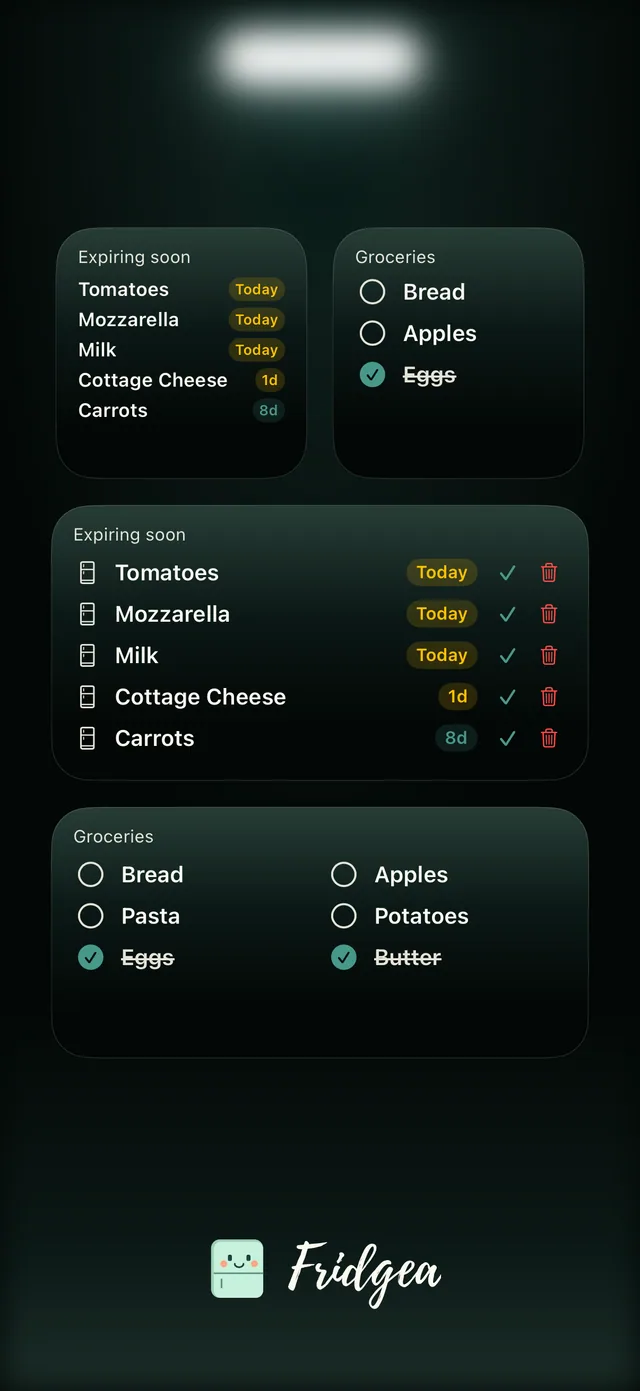
- Widgets for the Home Screen and Lock Screen, in several sizes.
- Clean-up help: when a few items have expired, Fridgea offers to clear them and put them back on your shopping list.
- Act from the notification itself: mark food as used or add it to your shopping list.
Widgets that do more than look nice
The Expiring Soon widget lists what's due, colour-coded by urgency. Tap "Use one" or "Throw away" and it updates without opening the app. Add the Shopping List widget to tick items off from your Home Screen.
Why one notification beats ten
Per-item alerts get muted within a week. Fridgea bundles everything that's due into a single message, so the reminder stays useful — and when you open the app, the list is already sorted by what to use first.
Questions, answered
Are the reminders free?
Yes. Reminders and widgets are included in the free plan.
Will I get a notification for every item?
No. Fridgea groups everything that's due into one notification per day.
Can I choose when I'm reminded?
Yes — anywhere from 1 to 7 days before the expiry date.
Does it work on the Lock Screen?
Yes. There are Lock Screen widgets, and cooking timers appear as a Live Activity.
Try it on your iPhone
One calm notification before food expires, plus widgets that show what to use first.
Free on iPhone & iPad · No account needed